Add the little things
One field, a plus, done. Add things the moment you notice them rather than trusting the fridge door.
Milk, apples, that thing you nearly forgot. The house keeps one shopping list, everyone can see it, and whoever is out next ticks things off as they go into the basket.
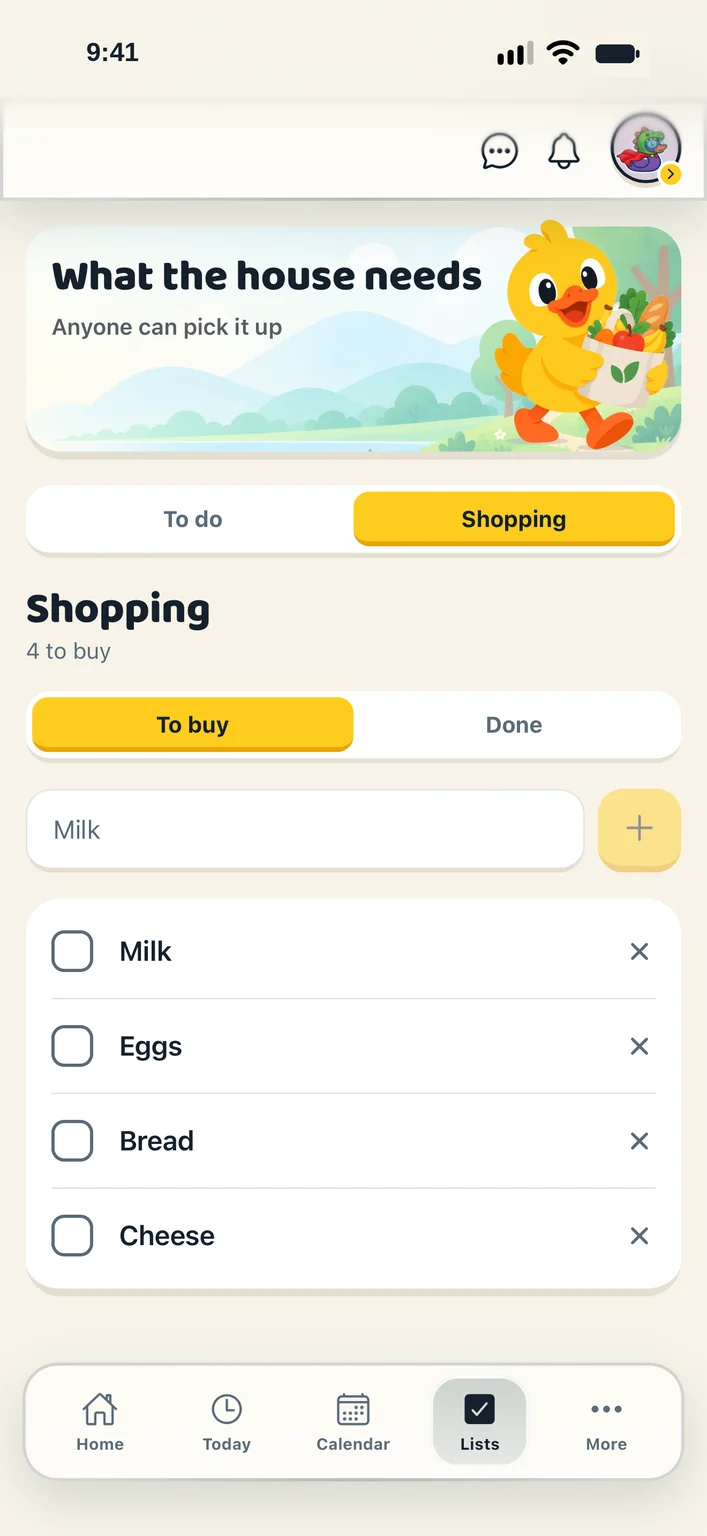
One field, a plus, done. Add things the moment you notice them rather than trusting the fridge door.
To buy and Done, side by side. Tick an item in the aisle and everyone sees “You got it”, or “Sarah got it”.
At the end of a shop, clear the done items in one go. The list is ready for next time.
Every household starts with a Shopping list. There is no “create a list” step to get past.
A grown-up decides per child: can see the list, can suggest, or can add. Suggestions wait under “Asked for” until a grown-up says yes.
Plan the week’s meals and the app builds the grocery list, leaves out what is in the pantry, and adds the rest here.
“Add to a list” on any message puts what someone said straight onto the list.
A shopping list is the thing people write on the fridge. It stays that easy.
No. A child gets a profile, their own duck and jobs to claim without a login or an email address. When they are older you can invite them to sign in, and their whole history of claimed chores comes with them.
Fourteen days free, with nothing held back, then $4.99 CAD a month or $45.99 CAD a year. That is one subscription for your whole household and every feature in the app: there is no higher tier and nothing kept back to sell you later. Cancel any time in a couple of taps.
Create your household, add your people and choose your ducks. Everything for a fortnight, then one subscription covers your whole flock.